
06 / Pisco Ball Part 2
- May 6, 2016
- 3 min read






Arduino Code
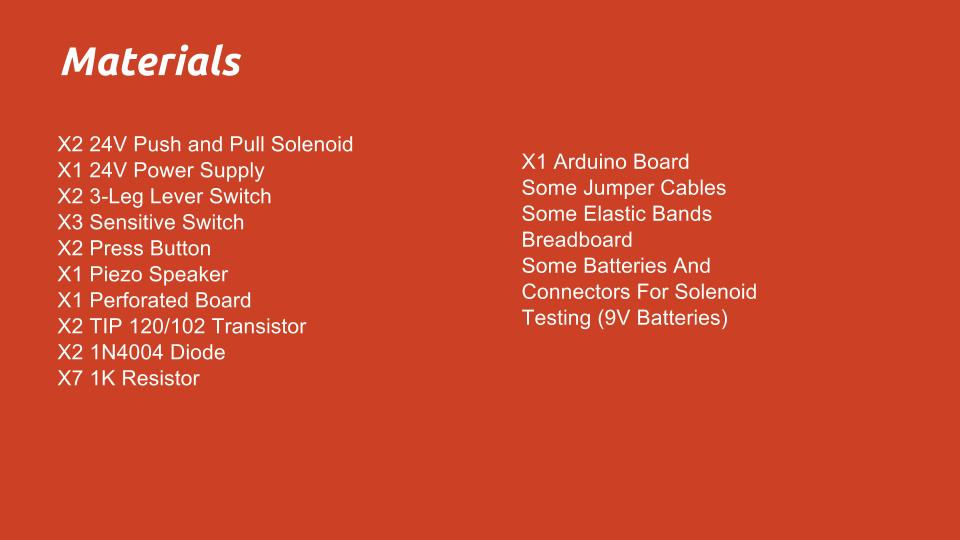
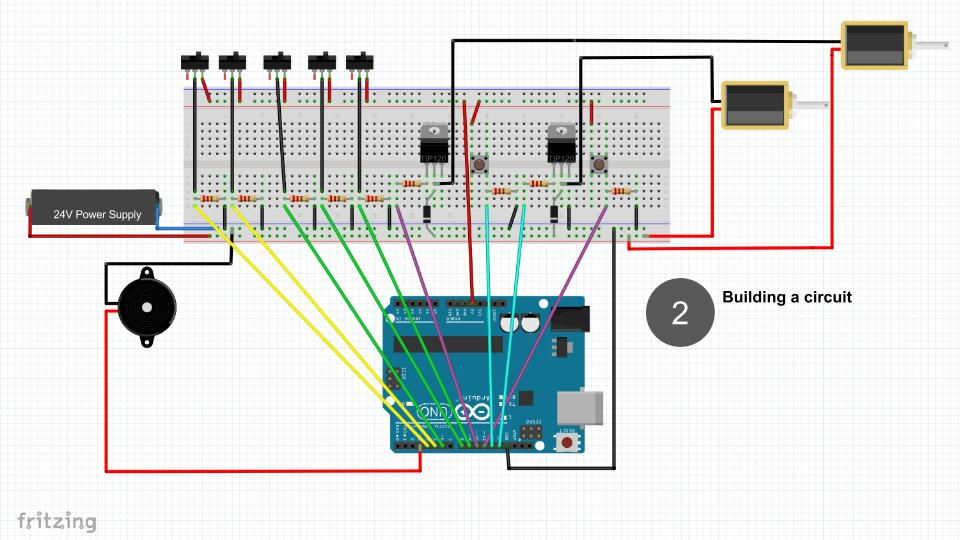
// set pin numbers: const int buttonPin1 = 4; // the number of the pushbutton pin const int buttonPin2 = 5; // the number of the pushbutton pin const int buttonPin3 = 6; // the number of the pushbutton pin const int buttonPin4 = 8; // the number of the pushbutton pin const int buttonPin5 = 9; // the number of the pushbutton pin // PADDLE Left/Right const int buttonPinL = 11; // Pushbutton Left Paddle const int relayPinL = 13; // Solenoid Left const int buttonPinR = 10; // Pushbutton Right Paddle const int relayPinR = 12; // Solenoid Right
int Buzzer1 = 3; // Piezo speaker
// variables will change: int buttonState1 = 0; // variable for reading the pushbutton status int buttonState2 = 0; int buttonState3 = 0; int buttonState4 = 0; int buttonState5 = 0;
// variables will change: int buttonStateL = 0; // variable for reading the pushbutton status int buttonStateR = 0; // variable for reading the pushbutton status
void setup() {
//Paddle // initialize the Solenoid pin as an output: pinMode(relayPinL, OUTPUT); // initialize the pushbutton pin as an input: pinMode(buttonPinL, INPUT); // initialize the LED pin as an output: pinMode(relayPinR, OUTPUT); // initialize the pushbutton pin as an input: pinMode(buttonPinR, INPUT);
// initialize the piezo as output: pinMode(Buzzer1, OUTPUT);
// initialize the pushbutton pin as an input: pinMode(buttonPin1, INPUT); pinMode(buttonPin2, INPUT); pinMode(buttonPin3, INPUT); pinMode(buttonPin4, INPUT); pinMode(buttonPin5, INPUT); }
void loop(){
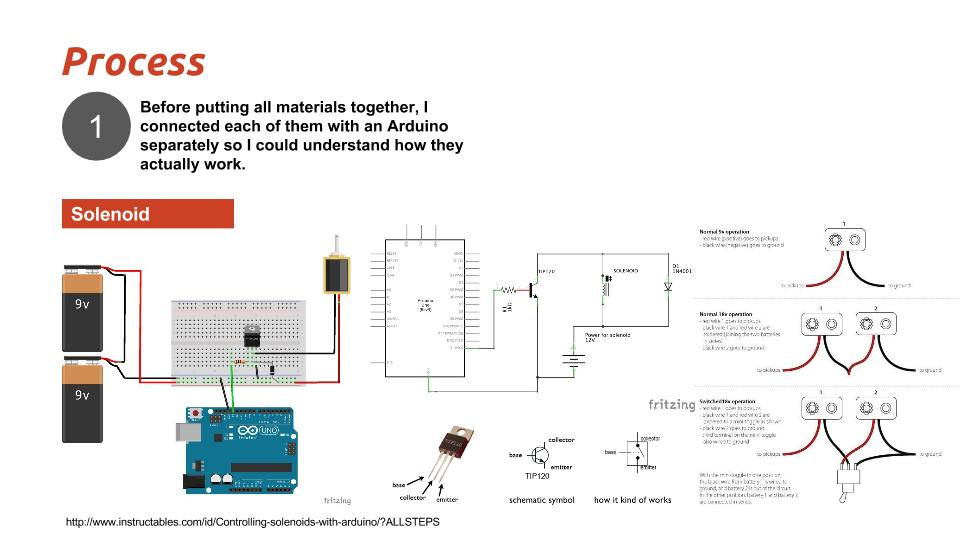
// PADDLE LEFT // read the state of the pushbutton values: buttonStateL = digitalRead(buttonPinL); // check if the pushbutton1 is pressed. // if it is we turn on the relay/solenoid if (buttonStateL == HIGH) { // turn relay on: digitalWrite(relayPinL, HIGH); delay(100); digitalWrite(relayPinL, LOW); delay(10); } // When we let go of the button, turn off the relay else if ((buttonStateL == LOW) && (digitalRead(relayPinL) == HIGH)) { // turn relay off digitalWrite(relayPinL, LOW); }
// PADDLE RIGHT buttonStateR = digitalRead(buttonPinR); if (buttonStateR == HIGH) { // turn relay on: digitalWrite(relayPinR, HIGH); delay(100); digitalWrite(relayPinR, LOW); delay(10); } else if ((buttonStateR == LOW) && (digitalRead(relayPinR) == HIGH)) { // turn relay off digitalWrite(relayPinR, LOW); }
//x5 Switches { // read the state of the pushbutton value: buttonState1 = digitalRead(buttonPin1); buttonState2 = digitalRead(buttonPin2); buttonState3 = digitalRead(buttonPin3); buttonState4 = digitalRead(buttonPin4); buttonState5 = digitalRead(buttonPin5);
// check if the pushbutton is pressed. // if it is, the buttonState is HIGH:
//Right 3Leg Lever switch if (buttonState1 == HIGH) { // play th Music tone(Buzzer1,400,200); delay(500); tone(Buzzer1,400,200); delay(500); tone(Buzzer1,450,225); delay(300); tone(Buzzer1,450,225); delay(500);
} else { // turn LED off: digitalWrite(Buzzer1, LOW); }
//Left 3Leg Lever switch if (buttonState2 == HIGH) { // play th Music tone(Buzzer1,400,200); delay(500); tone(Buzzer1,450,200); delay(300); tone(Buzzer1,600,300); delay(300); tone(Buzzer1,400,200); delay(500); } else { // turn LED off: digitalWrite(Buzzer1, LOW); }
// Red sensitive switch if (buttonState3 == HIGH) { // play th Music tone(Buzzer1,600,300); delay(300); tone(Buzzer1,400,200); delay(1000); tone(Buzzer1,400,200); delay(500); } else { // turn LED off: digitalWrite(Buzzer1, LOW); }
// White sensitive switch if (buttonState4 == HIGH) { // play th Music tone(Buzzer1,600,300); delay(300); tone(Buzzer1,400,200); delay(1000); tone(Buzzer1,400,200); delay(500); } else { // turn LED off: digitalWrite(Buzzer1, LOW); }
// Blue sensitive switch if (buttonState5 == HIGH) { // play th Music tone(Buzzer1,650,200); delay(300); tone(Buzzer1,650,200); delay(500); tone(Buzzer1,400,200); delay(600); } else { // turn LED off: digitalWrite(Buzzer1, LOW); } } }
Next Steps
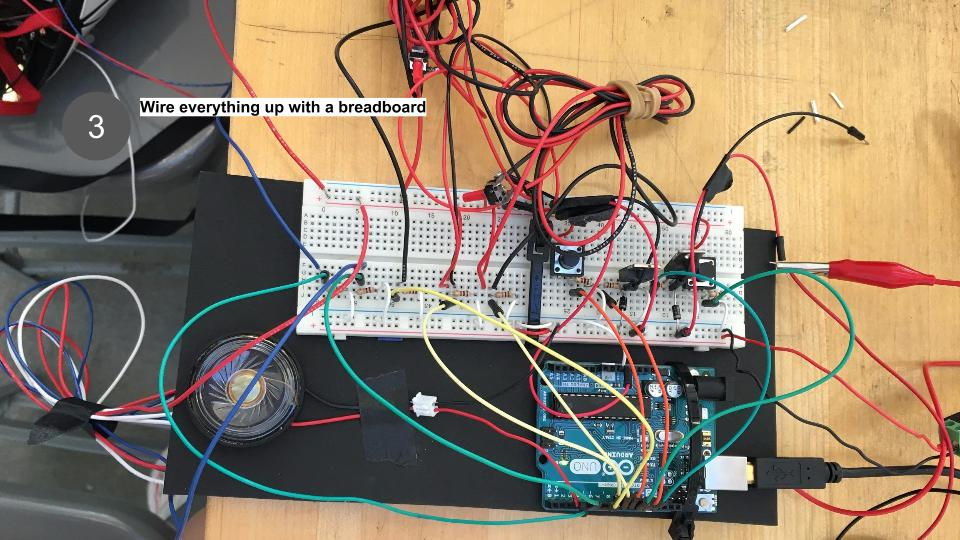
1. Connect solenoids separate from Arduino board to reduce information sent to the board and increase efficiency.
2. Experiment with different slopes to increase / decrease ball movement


Comments