
04 / HW Shapes
- Feb 16, 2016
- 1 min read
A/ The 1st Window

void setup() { size(400, 400); noStroke(); smooth(); noLoop(); } void draw() { // Draw thick, light gray X stroke(160); strokeWeight(5); line(0, 0, 400, 400 ); line(0, 400, 400 ,0); // Draw medium, black X stroke(100); strokeWeight(5); line(200, 125, 200, 275); line(125, 200, 275, 200); // Draw thin, white square stroke(255); strokeWeight(5); line(125, 125, 125, 275); line(275, 125, 275, 275); line(125, 125, 275, 125); line(125, 275, 275, 275); }
B/ Magic Windows

void setup() { size(400, 400); smooth(); noLoop(); }
void drawWindow(int gray, int weight, int x, int y, int size) { stroke(gray); strokeWeight(weight); //Draw crossed lines line(x, y, x, y+size); line(x-(size/2), y+(size/2), x+(size/2),y+(size/2) ); //Draw square line(x-(size/2), y, x+(size/2), y ); //square up line(x-(size/2), y+size, x+(size/2), y+size ); // square down line(x-(size/2), y, x-(size/2), y+size); // square left line(x+(size/2), y, x+(size/2), y+size); // square right
}
void draw() { for (int i=0; i<40; i++) { // 40 windows drawWindow(int(random(255)), int(random(20)), int(random(width)), int(random(height)), int(random(40, 100))); } }
C/ Fancy Stripes

Step 01 - one parameter
Applied random(500)
Step 02 - one parameter

Increase random numbers from 500 to 10,000

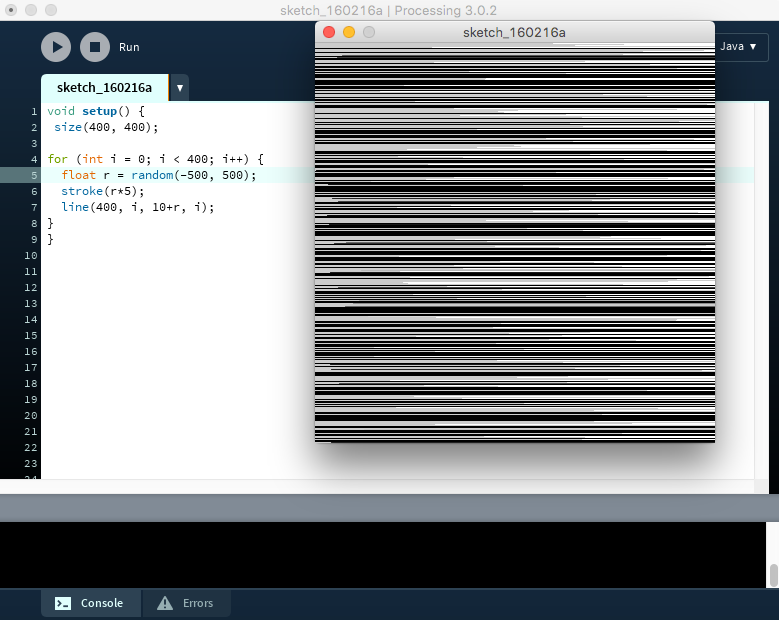
Step 03 - one parameter
Change lines' direction.
Step 04 - two parameters
Applied random(low,high)
**If two parameters are specified, the function will return a float with a value between the two values.

Step 04 - two parameters
Applied different lines' direct paths


Comments